Saturday, April 9, 2016

Apple Watch as Gaming Platform - Use the Digital Crown to control sprite movement for a Pong like game

Use the Digital Crown to control sprite movement

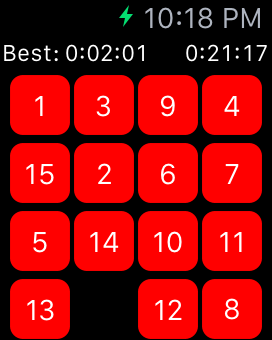
Welcome to my new WatchKit tutorial. Today I'll show that it is possible to use the Apple Watch as a gaming platform. First let's look back to the first WatchKit versions. They have been very limited in terms of possible input controls. A typical game was usually built with a number of WkInterfaceButtons and looked like this:


15 Puzzle AppleWatch15 Puzzle AppleWatch


Since WatchKit 2 it is possible to use the Digital Crown for custom apps. This provides way more possibilities for great games, like this Watch Ping Pong version created by me.
I'll publish the Source Code as OpenSource in my GitHub repository, once I have reached 1000 downloads. Currently only 986 to go ;-)


Pong AppleWatch


Friday, November 20, 2015

Quick Tip: Endless scrolling with SpriteKit and SWIFT (Part 2 of 2)

Natural endless scrolling with easing

Welcome to my tutorial series about scrolling:
  • Part 1: Endless scrolling with background tiles
  • Part 2: Natural endless scrolling with easing


In part one I showed how to implement endless scrolling. This is working fine, but there is still room for improvements. The scrolling starts immediately with full speed and also stops directly after the touch ends. A more natural movement would be to increase and decrease the speed slowly, till the target speed is reached or the movement is stopped. These is also known as ease in or ease out animation.
Thank you to hamobi who helped me with my Stackoverflow question for finding the right solution.

To give you an impression compare the two videos:

Without Easing:


With Easing:


Thursday, November 12, 2015

Quick Tip: Endless scrolling with SpriteKit and SWIFT (Part 1 of 2)

Endless scrolling with background tiles

Welcome to my new tutorial series about scrolling:
  • Part 1: Endless scrolling with background tiles
  • Part 2: Natural endless scrolling with easing

This video gives an impression what I'll show today:


1. About the algorithm and the background tiles


Creating the image tiles for the scrolling parts of the background:


First we need a background image:


Let's mirror this image and add the new one at the right side:


Thursday, October 1, 2015

Quick Tip: How to use the Apple TV remote to control a sprite in your TVOS Apps

How to use the Apple TV remote to control a sprite in your TVOS Apps

Since my Apple TV Developer kit arrived one week ago I had plenty of time to try certain things. I will blog about some of my prototypes in the next days.


Today I'll will focus again on the remote control. It provides, especially in combination with SpriteKit, a simple and very natural way to control a sprite on the screen. For a natural sprite movement the approach of my todays post is much better, the my article about gesture recognition on the AppleTV. 

Let's start...

1. Download the XCode 7.1 Beta from the Apple Developer Portal:


2. Create a new project:


Thursday, September 10, 2015

Quick Tip: How to use the remote control in your TVOS Apps for Apple TV in SWIFT

How to use the remote control in your tvOS Apps for Apple TV in SWIFT

There are already dozens of 'Hello world' tutorials published for the new Apple tvOS, so let's do something different. I'll show how to use the remote control to move a sprite on Apple TV. It was surprisingly easy and took me only 10 minutes to implement:

1. Download the XCode 7.1 Beta from the Apple Developer Portal:


2. Create a new project:


Saturday, August 29, 2015

Quick Tip: Implement the new Google AdMob / Adsense Cookie Policy

In the last days Google sent out emails to App developers which uses their AdSense and AdMob frameworks. Google urges them to inform their users about the usage of the advertising cookies:

From Google:
European laws require that digital publishers give visitors to their sites and apps information about their use of cookies and other forms of local storage. In many cases these laws also require that consent be obtained.

In this tutorial I'll  show how you can implement an information alert about the cookie usage in SWIFT. The basic idea is to detect, if the app is started the first time:
  • If yes show an alert with a message about the cookie usage. 
  • After clicking 'OK' store a key in NSUserDefault. 
  • Next time the application is started, this key will be found and therefore no alert will be shown.

IMPORTANT: I'm not a lawyer. So no guarantees. You have to decide on your own if this is sufficient.

AdMob Cookie Usage

Friday, July 10, 2015

Quick Tip: Combine iAd and AdMob Ads for iOS in SWIFT

Use iAd and AdMob ads in the same app

Today I'll show how to use iAd together with AdMob ads. If you use the interstitial ads provided by Apples iAd frequently, you might have seen that the fill rate is not always 100 percent:


One reason could be that there was just not enough time to load the new content. This tutorial shows how to improve the fill rate by requesting a Google AdMob ad in parallel. Depending on the availability, the iAd or the AdMob ad will be shown.

Wednesday, July 8, 2015

Quick Tip: Integrate iAd banners in your iOS App with two lines of code

The easiest way to add an iAD banner to your app


Today I'll show a very simple way to integrate an ad banner to your iOS app. Most tutorials (including mine) explain the complex version by implementing the ADBannerViewDelegate protocol. If you don't care about error handling, animations, positioning or the maximum number of allowed banner instances (10!): There is a much easier way which requires only two lines of code in SWIFT.

I've published an update for my (Watch) puzzle game in the Apple App Store

Yet Another (Watch) Puzzle Game:

Simple puzzle game inspired by the 15 Puzzle for Apple Watch, iPhone and iPad.
New in version 1.3: Puzzle mode - slide image tiles instead of numbers.

 
 iOS Simulator Screen Shot - Apple Watch 21 May 2015 22.36.29


AppStore


Saturday, June 13, 2015

Quick Tip: Implement fullscreen (interstitial) Ads for iOS in SWIFT

How to implement an Interstitial Ad combined with a counter

Today I'll show how to implement a often used pattern in free games: Usually you can play free games a certain time, till a fullscreen ad is shown. For example after each third game over an ad is shown. Implementing this behaviour for the iOS platform requires only few lines of code in SWIFT.

Thursday, June 4, 2015

How to implement In-App Purchase for your iOS App in SWIFT

Adding In-App Purchases:

Welcome to part 8 of my swift programming tutorial. Today I'll show how to implement In-App Purchases:
  • Create In-App Purchases in iTunesConnect
  • Implement In-App Purchases
  • Test and upload to iTunesConnect


As a starting point you can download the sample project from my GitHub repository.  

Thursday, April 30, 2015

How to debug on a real Apple Watch

Today my Apple Watch was delivered :-)

I immediately tried to deploy my prototypes to the Apple Watch, to see how the behave on real hardware. The simulator gives only a first impression. 


Here are my learnings: Basically you need to perform two steps:
  • Add the UDID of your apple watch to the developer portal
  • Update your provisioning profile to support the watch

Luckily XCode can manage the whole process for you.

Friday, April 24, 2015

SWIFT 1.2

I've updated all my SWIFT tutorials to SWIFT 1.2 and XCode 6.3. You can find them here.


Monday, April 20, 2015

New Blog Domain

I've moved my blog to a new domain: developerplayground.net

Unfortunately it looks like Google has lost it's interest in Blogspot. There have been no major updates in the last two years.

It also looks like that it is nearly impossible to get AdSense running with a Blogspot domain.

I have moved my blog to a new domain. I'll continue posting links and copies of my articles also here for a while. 

Wednesday, March 4, 2015

How to add Social Media Integration to your iOS App

Welcome to my new SWIFT tutorial. Today I'll show you how to implement social media integration for Facebook and Twitter. Additionally I'll explain Email integration and how to embed a direct  AppStore link to provide a convenient way for players to rate an app.

My latest game in the AppStore contains a sample:


The four buttons at the bottom of the screen trigger the social actions:


Tuesday, February 17, 2015

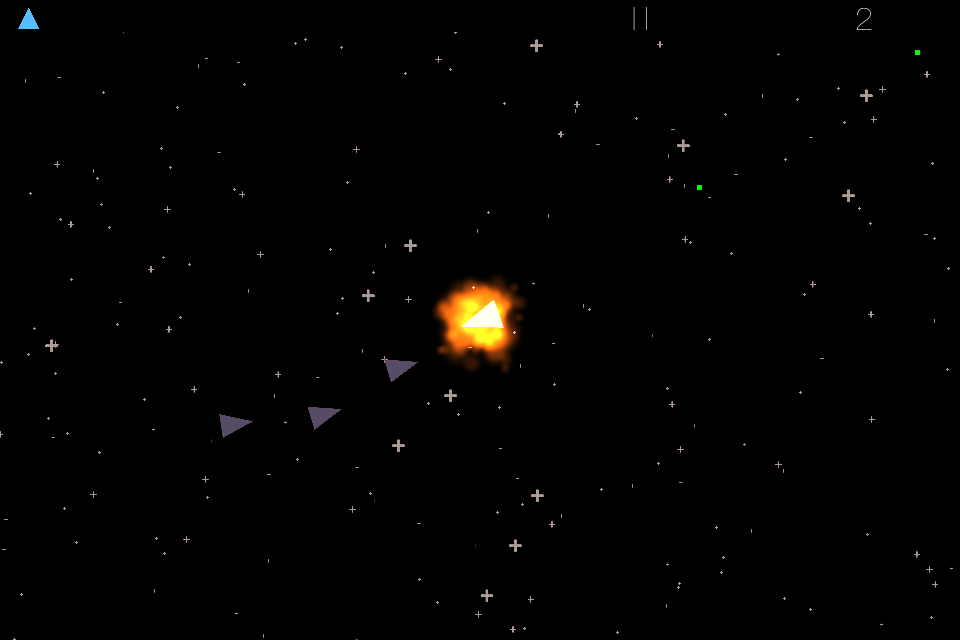
How to implement a space shooter with SpriteKit and SWIFT is in the AppStore

The sample game developed in my SpriteKit Tutorial is in the AppStore:


SourceCode: here


A more sophisticate game also based on the tutorial:


Tutorial Overview:

  • Part 1: Initial project setup, sprite creation and movement using SKAction and SKConstraint
  • Part 2: Adding enemies, bullets and shooting with SKAction and SKConstraint
  • Part 3: Adding a HUD with SKLabelNode and SKSpriteNode
  • Part 4: Adding basic game logic and collision detection
  • Part 5: Adding particles and sound 
  • Part 6: GameCenter integration

Monday, February 9, 2015

How to implement a space shooter with SpriteKit and SWIFT - Part 7: iAd integration

Adding iAd integration


Welcome to part 7 of my swift programming tutorial. In the previous parts we've created sprites, added movement, enemies with a follow behaviour, bullets & shooting, a HUD, collision detection, sound & particle effects and a global leaderboard using Game Center. Today I'll show how to integrate the Apple Advertising Framework iAD:
  • Enable iAd in iTunesConnect
  • Add a Banner Ad (at the bottom of the screen)
  • Add a Fullscreen Ad (after game over)

Wednesday, January 14, 2015

How to implement a space shooter with SpriteKit and SWIFT - Part 6: Game Center integration

Adding Game Center integration


Welcome to part 6 of my swift programming tutorial. In the previous parts we've created sprites, added movement, created enemies which follow our sprite, added bullets, a HUD, collision detection, sound and particle effects. Today I'll show how to integrate Game Center to add a global leaderboard.


The most complex part is doing configuration stuff in iTunes Connect. 3 from 4 steps of this tutorial are related to that. You need a paid Apple Developer Account to execute the next steps:

  • Upload our App to iTunes Connect  
  • Create a Leaderboard in iTunes Connect 
  • Create a Sandbox Test User in iTunes Connect
  • Coding 

Wednesday, December 17, 2014

How to implement a space shooter with SpriteKit and SWIFT - Part 5: Particles and Sound

Adding particles and sound 


Welcome to part 5 of my tutorial series. In the previous parts we've created a sprite, added movement, created enemies which follow our sprite, added bullets, a HUD, collision detection, .... 
But, for a real game some important elements are missing to beautify the game:
  • Sound effects: explosions, game over, ...
  • Particle effects: explosions, background star field 

I'll show how to implement this today. As a starting point you can download the code from tutorial part 4 here. 

Thursday, November 27, 2014

How to implement a space shooter with SpriteKit and SWIFT - Part 4: Collision Detection

Adding basic game logic and collision detection


Welcome to part 4 of my tutorial series. In the previous parts we've created a sprite, added movement, created enemies which follow our sprite, added bullets and a HUD. But, for a real game some essential parts are missing:

  • Collision detection between the bullets and our sprite
  • Basic game logic
    • Scoring
    • Pause
    • Life Lost & Game Over

I'll show how to implement this today. As a starting point you can download the code from tutorial part 3 here.